
Ten years ago, "controlling" your landscape lighting meant a mechanical timer with little plastic pins, or a photocell that guessed at dusk and drifted out of sync every few weeks. Today you can dim a single uplight from your phone, turn the whole backyard purple for a birthday, and get an alert when a wire run shorts out.
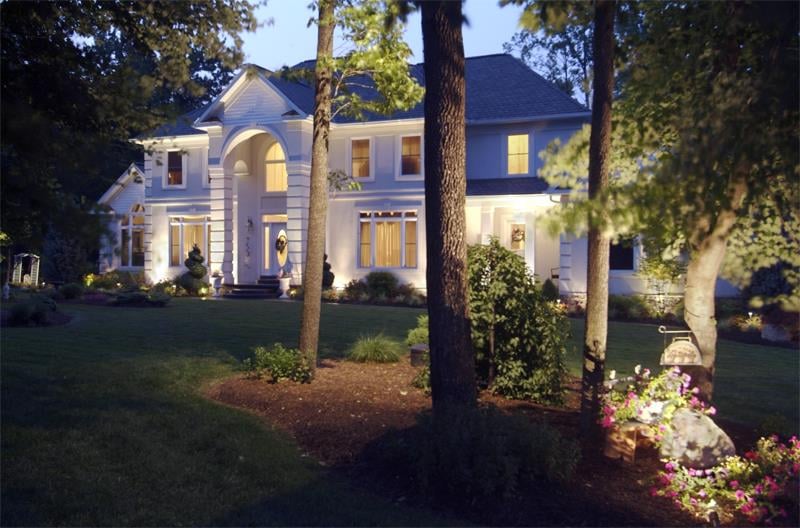
But "smart" covers a wide range of products at very different prices, and a lot of homeowners end up paying for features they never touch. At TLC, we install and program smart lighting controls across central Maryland, and part of our job is telling you which tier you'll actually use. We'll check the Wi-Fi signal at your transformer, size the system to your property, and walk you through the app before we leave, so the controller you paid for doesn't sit on its default schedule.
Below is an honest look at the controllers we think are worth it, who each one suits, and where the money stops making sense.
Three Levels of "Smart" Outdoor Lighting Controller
Almost every controller on the market falls into one of these tiers, and knowing which tier you want narrows the decision fast.
Level 1: Scheduling and on/off. Your lights come on at dusk, off at a set time, adjust themselves through the seasons, and you can override from your phone or a voice assistant. This is what most homeowners actually want.
Level 2: Zoning and dimming. You can run the front of the house separately from the patio, and set each area to a brightness that suits it. This is where a system starts to feel designed instead of just switched on.
Level 3: Color. Full RGB color and tunable white, so you can run warm light most of the year and green-and-red at Christmas without touching a fixture.
Each level costs meaningfully more than the one before it, and each level adds parts that can fail. Be honest with yourself about which one you'll use.
The Controllers We Recommend
Best for Most Homes: Kichler Smart Control Transformer
Kichler's Smart Control Transformer runs on the Kichler Connects app and hits the sweet spot for a typical residential system. The 300-watt model lets you schedule up to three separate lighting zones from one transformer, works with Kichler and other low-voltage fixtures, and includes power monitoring and fault detection along with a dusk-to-dawn astronomical timer. The app handles custom on/off schedules, syncing multiple transformers, and voice control through smart home devices.
The diagnostics are the underrated part. Built-in load and fault reporting tells you when a zone is operating outside its limits, which turns a vague "some of my lights are out" call into a specific repair.
Best for: front-and-back systems where you want zones, scheduling, and phone control without a premium price tag.
Skip it if: you want dimming per fixture or color.
Best Upgrade for an Existing System: Brilliance Wi-Fi Smart Socket 3.0
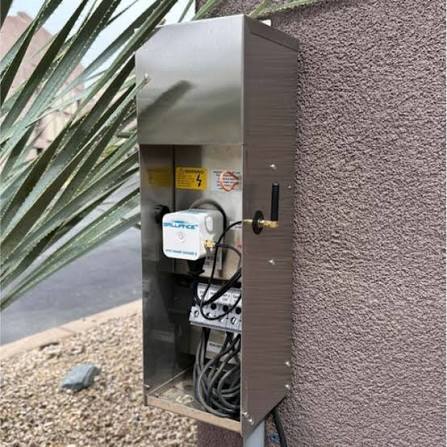
If you already have a working transformer and just want app control, you don't need to replace anything. The Brilliance Wi-Fi Smart Socket 3.0 pairs with a landscape lighting transformer in place of a traditional photocell, plugs into a standard 120-volt outlet, and is set up by scanning a QR code in the Brilliance Smart app. It supports timers, astronomical scheduling, multi-user sharing, and works with Alexa and Google Assistant.
One thing to check before you buy: it needs a consistent 2.4 GHz Wi-Fi signal at the transformer, with a signal strength of -70 dBm or better. Transformers usually live on the side of the house, often the farthest corner from the router. The 3.0 version added an antenna that fits standard half-inch transformer knockouts, which helps, but weak Wi-Fi at the transformer is the single most common reason these setups disappoint.
Kichler makes a similar in-transformer option. Its Smart Control Timer drops inside an existing transformer, runs on Bluetooth and Wi-Fi for local or cloud control, and uses an external antenna to extend range out of the metal enclosure.
Best for: a healthy existing system where the only complaint is the timer.
Skip it if: your transformer is undersized or failing. Fix that first.
Best Full-Featured System: FX Luminaire Luxor
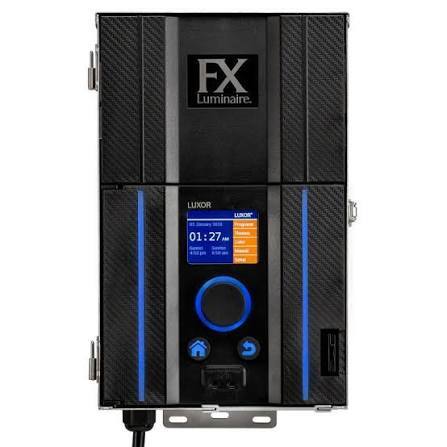
Luxor is the system most professional designers reach for when a property needs real control. It combines zoning, dimming, and color into a single controller using a simple two-wire installation, so you don't need extra wiring to get individual control. The ZDC version produces a spectrum of 30,000 colors using RGBW technology, and existing ZD systems can be upgraded by swapping the facepack and adding a replacement kit to each fixture.
Two features matter on larger properties. The Luxor CUBE lets the controller zone and dim fixtures and devices that don't have FX technology built in, and comes in low-voltage, line-voltage, and relay versions — that's how you bring water feature pumps or a gate into the same system. And Luxor Linking connects up to nine satellite units to one point of control, for ten units total, which is how you light several acres without ten separate apps.
Best for: large or complex properties, and anyone who genuinely wants color and scene control.
Skip it if: you have a simple six-fixture front yard. You'd be buying capability you'll never open the app to use.
Best for Color and Modern Architecture: WAC Colorscaping
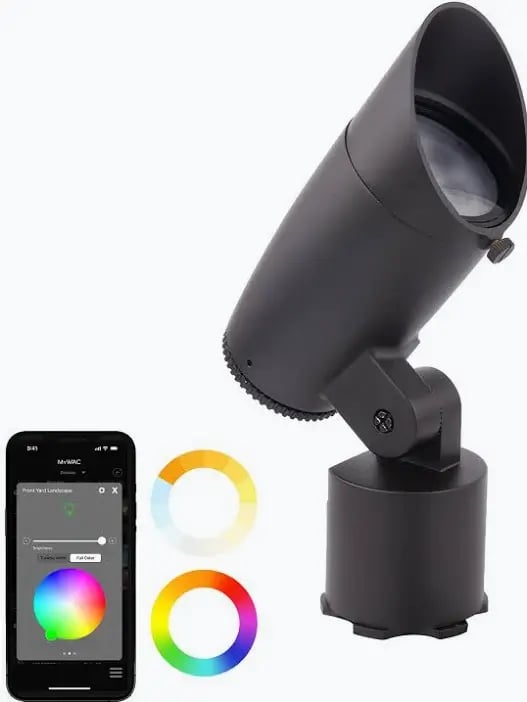
WAC took a different approach: instead of zone-level control, every fixture is individually addressable. The MyWAC app handles custom colors, scenes, zones, and groups over Wi-Fi or wired ethernet, and schedules can follow dates, events, or sunrise and sunset. Each fixture adjusts from 2700K to 6500K plus full color, and the smart transformer comes in 150-watt and 300-watt capacities with surge protection.
The practical advantage is that you don't have to start over. Smart fixtures wire to Zone 1 and standard fixtures to Zone 2 on the same transformer, and those legacy circuits become controllable as a single group in the app. It also integrates with major control platforms as an alternative to app control, which matters if the house already runs on a system like Control4 or Savant.
Best for: modern homes, architectural lighting, and clients who want tunable white year-round rather than just holiday color.
Best for Zone Control on a Budget: Brilliance Sector Selector and Zone Control
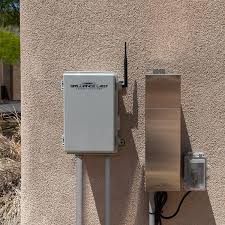
Not everyone needs a whole new transformer to get zones. The Brilliance Sector Selector is an 800-watt smart controller that splits a system into four sectors of 200 watts each, and the Wi-Fi Low Voltage Zone Control lets Brilliance dimmable LED lamps be controlled through the Brilliance Smart app, mounted next to the transformer or out in the field.
Best for: adding zoning or dimming to a system that's otherwise fine.
Best When Wi-Fi Won't Reach: Bluetooth controllers
If your transformer sits at the far corner of the house and the signal dies there, Bluetooth is the honest answer. Sollos pairs its transformers with a Bluetooth app that handles zoning, and the Sollos Eclipse app adds sunrise and sunset adjustment by location, a real-time clock, and power usage monitoring. Vista takes the same approach. Its product manager has said the company chose Bluetooth over Wi-Fi specifically so contractors don't need access to a homeowner's wireless network to set the system up.
The tradeoff is real: you have to be near the transformer to make changes. No adjusting the lights from a hotel in Florida.
What Matters When You're Choosing an Outdoor Lighting Controller
Here's the short version of what we check on every job, in order of how often it causes problems.
Wi-Fi signal at the transformer. This sinks more smart lighting installs than any hardware defect. Check it before you choose a Wi-Fi controller, not after.
How many zones you really need. Most homes are happy with three: front, back, and accent. Paying for per-fixture control you never use is the most common overspend in this category.
Whether the controller locks you into one fixture brand. Some controllers only deliver their full feature set with that manufacturer's fixtures. That's fine going in, expensive later when you want to add two lights and the brand has changed its line.
Diagnostics. A controller that reports load and faults saves you money on service calls for years.
Dimming range. Dimming isn't just mood. Running fixtures below full output extends lamp life and cuts glare.
Serviceability. Ask whether the controller's parts are field-replaceable, and whether your installer stocks them. A proprietary board with a six-week lead time is a dark yard for six weeks.
Which One Should You Pick?
- "I just want the lights on a schedule and off my mind." A smart socket or smart timer in your existing transformer. It's the cheapest real upgrade in outdoor lighting.
- "I want the patio separate from the front of the house." A zoning transformer like Kichler's Smart Control.
- "I want color for the holidays." FX Luminaire Luxor ZDC or WAC Colorscaping. Nothing cheaper does color well.
- "I have three acres, a pool, and a water feature." Luxor, with linking and CUBEs.
- "My Wi-Fi barely reaches the driveway." A Bluetooth system, or fix the Wi-Fi first.
The Mistakes We See Most
Buying color you'll never use. Ask yourself how many days a year you'd change colors. If the answer is four, a color system is expensive holiday decor.
Putting a smart controller on a bad system. Controllers don't fix corroded connections, undersized wire, or a transformer running at capacity. They just let you watch the problem from your phone.
Skipping the walkthrough. Every one of these systems has an app most homeowners use twice and then forget. A 15-minute handoff at the end of the install is the difference between a system you enjoy and one you leave on the default schedule forever.
Ignoring Maryland winters. Freeze-thaw cycles work on buried connections, and coastal salt air near the Bay is hard on hardware. Whatever controller you choose, the fixtures and connections around it need to be rated for it.
TLC installs custom outdoor lighting systems throughout central Maryland — request a free lighting design, and we'll show you exactly what your property would look like after dark.

Frequently Asked Questions
Can I control my landscape lights with Alexa or Google Home?
Yes, with most of the systems above. The Brilliance Smart Socket works with Alexa and Google Assistant, and Kichler Connects supports voice-controlled home devices. Higher-end systems also integrate with whole-home platforms.
Do I need to replace my whole system to get smart control?
Usually not. If your transformer and wiring are sound, a smart socket or in-transformer timer adds app control and scheduling for a fraction of the cost of a new system. You'd only replace the transformer if you want zoning, dimming, or color, or if the existing one is undersized or failing.
What's the difference between a smart timer and a smart transformer?
A smart timer controls power to the whole system: everything on, everything off, on a schedule you set from an app. A smart transformer controls parts of the system independently, so you can run zones at different times and different brightness levels.
Do smart controllers work with fixtures from other brands?
Partly. Basic scheduling and on/off work with almost anything, since the controller is just managing power. Kichler's Smart Control Transformer is compatible with other brands' low-voltage fixtures. Per-fixture dimming and color generally require that manufacturer's fixtures, though there are workarounds: FX's CUBE brings non-FX fixtures into a Luxor system, and WAC's transformer makes existing non-WAC lights controllable as a group.
What happens if my Wi-Fi goes down?
Your lights keep running on their last schedule. You lose remote control until the connection returns, not the lighting itself. That's why the schedule matters more than the app.
Will a smart controller save me money on electricity?
A little, mostly through dimming and accurate dusk-to-dawn scheduling rather than the controller itself. The bigger savings come from LED fixtures. Treat smart control as a convenience and design upgrade, not an energy investment.